Git
The Git plugin surfaces the state of a Git repository right inside the file panel — no separate app, no
terminal. It adds two columns, a Git submenu, a docked panel for staging and committing, and windows for
history, blame, branches, conflicts and rebasing. It drives the git already installed on your Mac. It's a
plugin, so you can turn it off or remove it in Configuration ▸ Plugins….
What it adds
- Two file-list columns — Git Status and Branch. Each file shows an icon and a short status word (Modified, Added, Deleted, Untracked, Renamed, Copied, Conflict, Ignored, Type changed), with (staged) where the change is already in the index; the Branch column shows the branch that file's repository is on. Turn the columns on in Configuration ▸ Columns… (see View modes & sorting).
- A Git menu — under Commands ▸ Git, and in the right-click menu of a file.
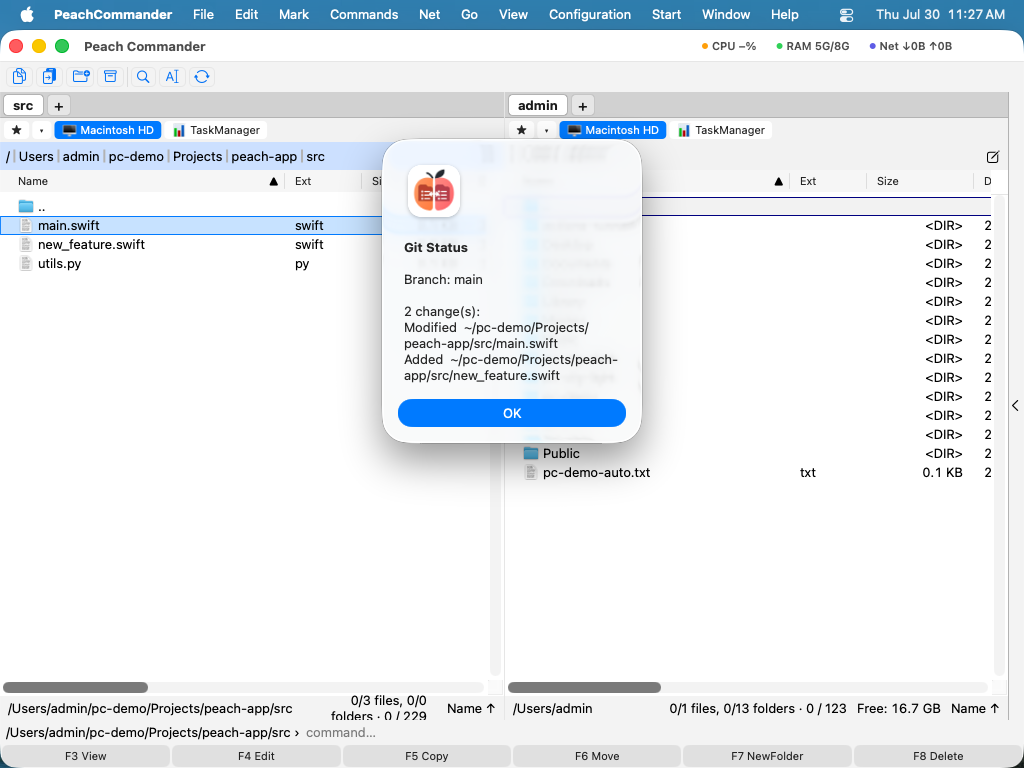 (Figure: Git Status reports the branch and every change in the working tree.)
The panel: stage, commit, sync
Commands ▸ Git ▸ Panel docks a view showing the working tree grouped into staged, changed and untracked. Select files and use Stage, Unstage or Discard…, type a message and press Commit — with Amend to fold the change into the previous commit instead. Pull and Push are there too, next to the commit that usually precedes them; both show progress and can be cancelled.
Committing uses the index, not git commit -a: what you staged is what is committed.
History, blame and the web
- History… lists the commits with a lane graph, the refs pointing at each one (
● main,↗ origin/main,⚑ v1.0), and the files each commit touched. Enter or a double-click opens that file's version against its parent in the compare window. Revert commit and Cherry-pick are there, and both refuse up front if the working tree is not clean. - File History… is the same window for one file.
- Blame (list)… shows every line with its commit, author and date. Blame in the Editor puts the same information in the editor's gutter, next to the line numbers: hover a line for the commit's message, click it to open that commit against its parent.
- Open on the Web opens the file, commit or branch on GitHub, GitLab, Bitbucket or Azure DevOps, built from the remote's URL — no account, no token. For a host whose link layout it does not know, it offers the repository page rather than guessing.
Branches, stashes and tags
Branches, Stashes & Tags… lists all three. Switch, create, merge or delete a branch; push, pop or drop a stash; create, delete or push a tag, or switch to one — a tag is not a branch, so it says up front that HEAD will end up detached. Fetch, Pull and Push are in the same window and can be cancelled while they run.
Pushing a tag is a separate action on purpose: git push does not carry tags.
Conflicts
Resolve Conflict… lists the conflicted regions of the file under the cursor and takes a decision for
each: ours, theirs, both, or leave it open. Then Write file or Write and stage. It refuses to
stage while a region is still open — Git will happily commit <<<<<<< markers — and it refuses to touch a
file whose markers it cannot read rather than guessing at them. For a region that needs both sides
interleaved by hand, Open in editor is one button away.
Rebase
Rebase… lists the commits ahead of the upstream — the ones nobody else has yet — and lets you squash, fix up, drop, reorder or reword them before rewriting the branch. If a rebase stops in a conflict, the same window becomes Continue / Skip commit / Abort rebase, so a half-finished rebase does not have to be finished in a terminal.
Ignoring files, and credentials
- Ignore This File…, Ignore This File Type… and Ignore This Folder… add the right pattern to
.gitignore— anchored where it should be, so ignoring thisbuildfolder does not ignore every folder calledbuild. - Credentials… reports how this repository authenticates: SSH or HTTPS, whether a credential helper is configured, whether an SSH agent is running and holds a key. Where it helps, it offers one action — let Git keep credentials in the macOS Keychain. The plugin never asks for, shows or stores a passphrase.
Notes
- The plugin uses the system Git at
/usr/bin/git. If Git isn't installed, the commands report that Git is not available. (Installing the Xcode Command Line Tools provides it.) - Repository status is read once per folder and cached, so scrolling a large repo stays fast; the cache refreshes after any command that changes the tree, and follows a commit made outside the app.
- Linked worktrees and submodules are supported: a file inside a submodule shows the submodule's status and branch, not the parent's.
- Every list has a context menu, Return runs its main action and Cmd+R reloads the window.