MCP servers and skills
Agents call their tools on MCP servers (Model Context Protocol). Quena records these exchanges, shows each tool call with its arguments and result, and traces it from the model's answer that asked for it to the request that carried the result back. It also sums up which tools and skills the agents offered and used. This page is about MCP traffic; the MCP server Quena itself offers to agents is on Quena's MCP server.
What is recognised
Quena takes apart JSON-RPC 2.0 with the methods of the protocol (initialize, tools/list,
tools/call, resources/…, prompts/…, notifications/… …) over these transports:
- Streamable HTTP: a POST answered with JSON or with a stream of server-sent events;
batches (several requests in one POST) are shown with the first request and how many more
(
tools/call a +1); - the older SSE transport: a GET stream that announces an endpoint (
event: endpoint), and POSTs to it. The server answers such a POST with202and sends the result on the stream; Quena takes it from there. The stream stays open for the whole run and is marked when it closes; - stdio, recorded by
quena-cli mcp-tap(see Servers that talk over stdio).
Which HTTP sessions are looked at is decided by what is cheap to see; the body must then be JSON-RPC with an MCP method. A session is looked at when:
- the request or the response has an
Mcp-Session-IdorMCP-Protocol-Versionheader; or - it is a POST whose
Acceptheader names bothapplication/jsonandtext/event-stream, as MCP clients must send; or - it is a GET or POST to a host starting with
mcp., or to a path ending in/mcp,/sse,/messagesor/message, or containing/mcp/.
An MCP server on another path whose client sends none of these headers is not recognised. Calls to LLM APIs are never taken for MCP. HTTPS decryption must be on, as for any HTTPS content.
The MCP view
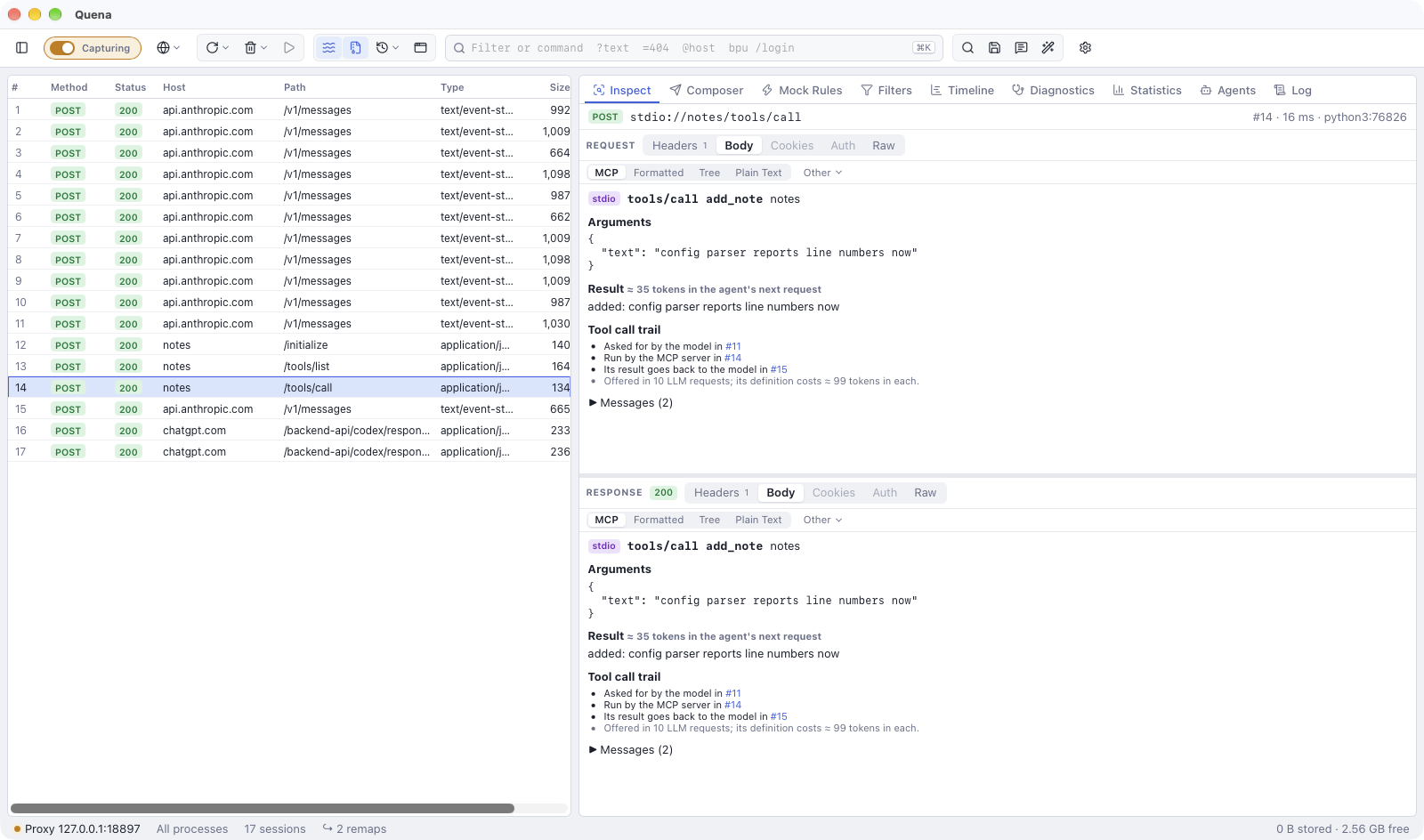
Selecting an MCP exchange opens the MCP view (when the exchange carries MCP headers or
comes from mcp-tap; otherwise pick MCP from the views):
- the method (
initialize,tools/list,tools/call,resources/read…), the server's name and version, the protocol version and the MCP session id; - for
tools/call: the tool, its arguments, the result (text, images, audio, resources, structured content), whether it failed (a JSON-RPC error orisError), and about how many tokens the result adds to the agent's next request; - the tool call trail;
- for
tools/list: the tools offered with the tokens each definition costs, and what they cost together in every LLM request that offers them all; - all JSON-RPC messages sent and received.
Texts longer than 100,000 characters are shortened in this view; the body views show them whole.
Tool call trail
For a tools/call, the MCP view shows the Tool call trail:
- Asked for by the model in: the LLM call whose answer asked for the tool. Quena looks for the latest LLM call that started up to 10 minutes before the exchange and whose answer called this tool of this server, preferring one of the same client process (several agents may call the same tools at once).
- Run by the MCP server in: this exchange.
- Its result goes back to the model in: the next call of that conversation, which carries the result to the model.
It also says in how many LLM requests the tool is offered and what its definition costs in each.
The other way round, the LLM view lists under the answer the MCP exchanges that ran its tool calls: for each tool call, the first exchange of that server's tool after the answer and before the conversation's next turn (or within 10 minutes), of the same client process first.
Tools are matched by name and server. Claude Code names MCP tools mcp__server__tool
(mcp__jira__get_issue); that is matched with the tool get_issue of a server whose name
(from initialize, else its host) fits jira. Names are compared without case, punctuation
and words like mcp or server, so claude_ai_Jira, Jira MCP and mcp.jira.example all
fit.
Columns, grouping and filters
Exchanges get the flags x-quena-mcp (the method and tool, e.g. tools/call get_issue) and
x-quena-mcp-server (the name from initialize, else the host; for mcp-tap the name given
with --name), and x-quena-agent, the agent from the User-Agent (as for LLM calls):
- columns MCP and MCP server;
- Group by → MCP server;
- filters
mcp ~ "tools/call"andmcpserver == jira(see syntax).
Archives from other tools get these flags when you open Tools & skills or a tool call's trail.
Servers that talk over stdio
Most MCP servers run as a local process and talk over stdin and stdout; no proxy sees that.
Put quena-cli mcp-tap in front of the server's command in the MCP client's configuration.
Install quena-cli
quena-cli is a download of its own, next to the app (see quena-cli).
Give its full path in the configuration: apps started from the dock or the start menu do
not see your shell's PATH.
Configure the MCP client
The pattern is always the same: the client runs quena-cli, and everything after -- is the
server's own command.
For a server you have already added, remove it first (claude mcp remove jira) or edit
its command and args in the configuration file.
In ~/.codex/config.toml:
In .vscode/mcp.json of the workspace (or the user mcp.json):
On Windows, use the path of quena-cli.exe; commands like npx or uvx that are .cmd
files are run through cmd.exe.
What is recorded
mcp-tap runs the server and passes everything through unchanged. It pairs the requests with
their responses and appends each exchange to mcp-tap/<name>-<pid>.jsonl in Quena's data
folder. The files are readable only by your user (0600): they hold tool arguments and
results.
While Quena captures, it reads the folder every second and shows the exchanges as sessions
stdio://jira/tools/call, with the server's process and the name given with --name as MCP
server. Requests of the server to the client (sampling, roots, elicitation) appear as
stdio://jira/server/…. Requests never answered (the server ended, the client cancelled)
appear without a response. Exchanges recorded while Quena does not capture wait in the folder
and appear when it captures again.
Portable app and data folder
mcp-tap finds the data folder as the app does: QUENA_DATA_DIR, else the portable folder,
else your user's data folder. When the app runs portable or with QUENA_DATA_DIR and
quena-cli does not see the same, add --data-dir "<the app's data folder>" before --
(About Quena shows the folder).
Signals and exit codes
A signal to mcp-tap (Ctrl-C, SIGTERM, SIGHUP, the client ending the server) is passed on:
the server gets SIGTERM and five seconds to end, then it is killed. mcp-tap exits with the
server's exit code (128 plus the signal number when the server was ended by a signal), or 2
when its own arguments are wrong or the server cannot be started.
Limits
- When the data folder cannot be written, the server still runs, without recording.
- A recording file stops growing at 1 GB: later exchanges are not recorded, the server keeps running.
- A message larger than 32 MB is passed through but not recorded.
- Up to 10,000 requests can wait for their answer; beyond that the oldest are recorded without one.
- The app reads at most 4 MB of recordings per second; the rest follows in the next seconds.
- Recordings read completely are removed after 7 days without new exchanges.
Tools and skills
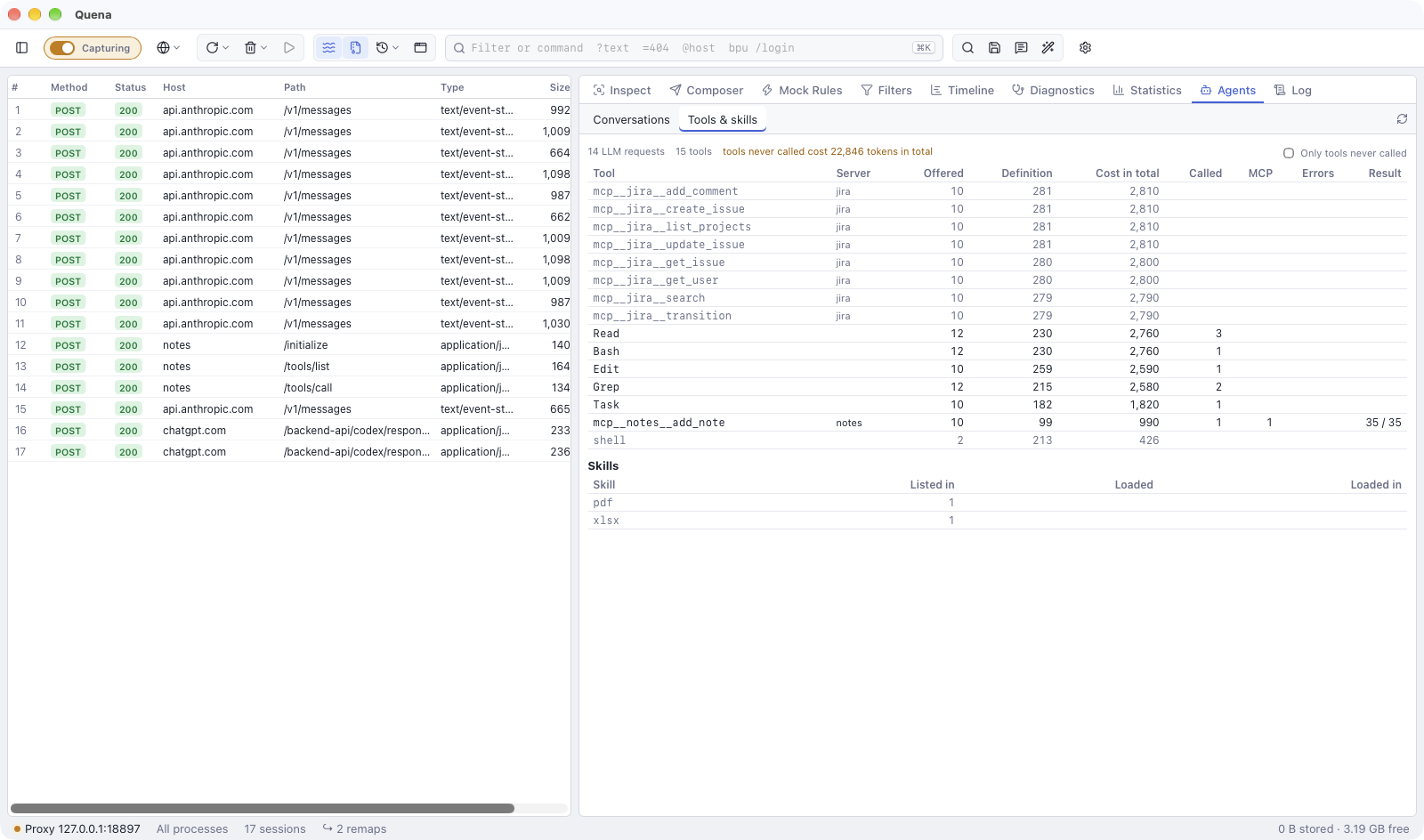
Agents → Tools & skills sums up the tools and skills of all conversations in the capture:
- every tool, most expensive first (its definition's tokens times the requests that offer
it): the server, the LLM requests that offer it, what its definition costs in each and in
total, how often the model called it, the exchanges with its MCP server, the failures
(an error or
isError), and the average and largest result in tokens of the calls that did not fail. Tools that are offered but never called are shown muted; Only tools never called lists them alone, with what they cost in total. MCP tools named the way Claude Code names them (mcp__jira__get_issue) are matched with the server'sget_issue; - every skill: in how many conversations it is listed, how often the model loaded it
(Claude Code's Skill tool, or reading its
SKILL.mdwith a file tool orcat,sed,head,less), and in how many conversations. Plugin skills keep their scope (anthropic-skills:docx).
For AI agents
Over Quena's MCP server, get_tool_report returns the same report of tools and
skills, and the session rows carry the MCP flags.