Inspect
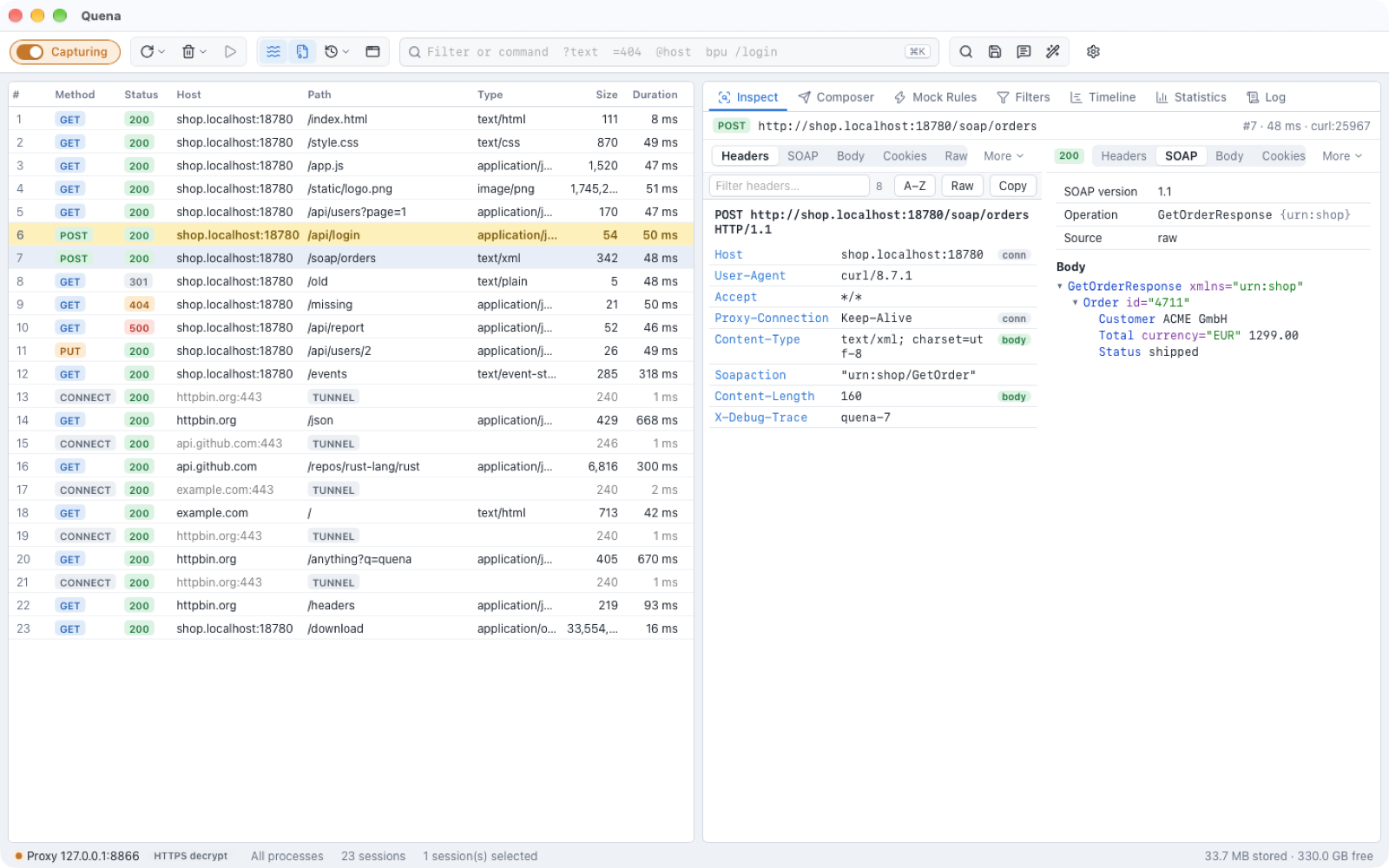
Select a session and the Inspect tab (F8) shows it: a header line with method, URL,
session number, duration and process, then a Request and a Response card, each
with its own row of views.
- In the Quena layout, request and response are side by side; in Classic the request is above the response. Switch any time with View → Request Above Response / Request Beside Response. In a narrow pane they go above each other automatically.
- Drag the splitter between them to change the proportions.
- The response card shows the status as a badge.
Views
| View | Request | Response | Shows |
|---|---|---|---|
| Headers | ✅ | ✅ | Start line and a header table in wire order, with a filter box, topic tags (auth, cookie, cache, cors, body, conn, fetch, policy), optional A–Z sorting, a raw mode and Copy. Double-click a value to copy it. |
| Plain Text | ✅ | ✅ | The body as plain text. |
| Body | ✅ | ✅ | The body with syntax highlighting and a Format switch for pretty-printing (JSON, XML …). |
| Form Data | ✅ | URL-encoded form fields as a table. | |
| Hex | ✅ | ✅ | Hex dump of any size; jump to an offset (hex or decimal). |
| Auth | ✅ | ✅ | Authentication headers, decoded (see below). |
| Cookies | ✅ | ✅ | Cookies sent, or cookies set with their attributes. |
| Raw | ✅ | ✅ | The message as it went over the wire. |
| JSON | ✅ | ✅ | JSON as a collapsible tree. |
| XML | ✅ | ✅ | XML as a collapsible tree. |
| Encoding | ✅ | How the response body is encoded (compression, chunking). | |
| Image | ✅ | The image. | |
| Preview | ✅ | The response rendered in a sandboxed frame without scripts, forms or network access. | |
| Caching | ✅ | The response's caching headers (Cache-Control, Expires, validators). |
The body views have Wrap, Format (where available) and Save… (save the body to a file). Compressed bodies (gzip, deflate, brotli, zstd) are shown decoded; the Decode toggle in the toolbar switches this off, and a banner then offers to decode again. The recorded bytes are never changed — decoded and formatted views are derived from them.
Views for special content
These views appear only when the content fits:
| View | Appears for | Shows |
|---|---|---|
| WebSocket | WebSocket sessions | the frame log with direction, type, size and payload; All frames or Text messages only |
| SSE | text/event-stream responses |
the stream split into events, live |
| gRPC | gRPC / Protobuf messages | message frames and a schemaless field tree (no .proto needed) |
| Parts | multipart/* bodies, including MTOM |
the parts of multipart/related, form-data and mixed |
| SOAP | SOAP envelopes | SOAP version, action, operation, body and SOAP faults |
| Atom/OData | Atom feeds and OData (v2/v3 Atom) | entity sets and types, entries, properties and links |
SOAP and Atom/OData also work on the output of decoder plugins, e.g. Fast Infoset. Plugins can add further views, such as Fast Infoset and GraphQL.
Which view opens
- The views are ordered by how well they fit the content: Headers first, then the special and plugin views, then Body, and so on.
- As many views as fit the width are shown as tabs; the rest are under More. The active view is always visible.
- Until you choose a view for a kind of content, the one that fits opens: SOAP for SOAP, gRPC for gRPC, WebSocket for WebSockets, Image for images, Form Data for form requests, Body for JSON, XML, HTML, JavaScript, CSS and text, Hex for binary content, Headers when there is no body.
- Quena remembers the view you choose per kind of content, separately for request and response. Choose XML once for a SOAP response, and every SOAP response opens in XML; JSON can stay on Body at the same time.
The memory can be switched off, or cleared, in Settings → General → Inspector views. With it off, the last view chosen is used for every session.
Character encodings
Text is shown in the character encoding (charset) the message is in, determined the way browsers do it:
- a byte order mark (UTF-8, UTF-16) at the start of the body;
- the
charsetof theContent-Typeheader; - the document's own declaration —
<?xml … encoding="…"?>in XML,<meta charset>in HTML; - the default of the type: UTF-8 for JSON and XML; other text is UTF-8 when it is valid
UTF-8, else windows-1252.
ISO-8859-1andlatin1mean windows-1252, as in browsers.
The toolbar of Plain Text and Body shows the result, e.g. windows-1252 · header
(where it came from: BOM, header, document or default). If characters look wrong —
typically � for a body declared UTF-8 that is really Latin-1 — choose another charset in
the menu next to it. The choice applies to that message's views (text, Raw, JSON, XML,
SOAP, Atom, SSE, the large-body viewer and its search) until you select another session.
Parts shows each multipart part in its own charset, with its own menu; Form Data
decodes the fields in the form's charset (the Content-Type charset, else a _charset_
field, else UTF-8).
UTF-16 bodies are converted to UTF-8 for display and formatting; the recorded bytes are
never changed (Hex and Save… show them as they are). Find Sessions and Find in
body search the text in each body's charset. In Headers, parameters encoded after RFC
8187 (filename*=UTF-8''%E2%82%AC.pdf) are shown decoded below the value.
Large bodies
Bodies are read from disk in windows, so even multi-gigabyte bodies open instantly:
- Up to 8 MB (after decoding), a body opens in the regular editor.
- Larger bodies, and responses that are still arriving, open in the large-body viewer:
it shows size and line count (indexing runs in the background), jumps to a line, and
searches the whole body with Find in body and
↑/↓through the hits. - Hex works on bodies of any size.
- Save… writes the whole body to a file.
Auth view
The Auth view shows Authorization/Proxy-Authorization (request) and
WWW-Authenticate/Proxy-Authenticate (response) headers in readable form:
- Basic: the decoded
user:password. - Negotiate, Kerberos and NTLM: with the bundled Kerberos / NTLM plugin, the tokens are decoded (SPNEGO; Kerberos AP-REQ, AP-REP, KRB-ERROR; NTLM Type 1, 2 and 3). A Negotiate exchange that fell back to NTLM is flagged.
- JWT: with the bundled JWT plugin, JSON Web Tokens in Bearer or DPoP authorization,
cookies,
Set-Cookieand common token headers (X-Access-Token,X-Id-Token…) are decoded: header (alg, typ, kid …), claims with the registered ones explained,exp,nbfandiatas dates with "expired 3 h ago" / "valid for 12 min", and the signature algorithm. Signatures are not verified. Encrypted tokens (JWE) show their header.
Tokens a plugin recognises in cookies or other headers are listed below the authentication headers.
GraphQL
With the bundled GraphQL plugin, a GraphQL view appears for GraphQL requests
(application/graphql, or JSON with query/variables/operationName, batches and
persisted queries), showing the operation with the query pretty-printed, and for GraphQL
JSON responses, with the errors first.
Inspecting from elsewhere
- Enter or a double-click in the session list opens Inspect.
- Right-click → Properties… shows a session's metadata: state, process and PID, client and server addresses, TLS versions, ciphers, SNI and ALPN, HTTP/2 stream and all timers.
- Right-click → Compare with two sessions selected — see Analyze.