LLM traffic
Applications that use large language models talk to their APIs over HTTPS like any other client. Quena recognises these calls and shows them as what they are: a request to a model, its tools, the answer and what it cost, also when the answer came as a stream. How the calls of one agent run fit together is on Agent conversations.
What is recognised
| API | Recognised by |
|---|---|
| OpenAI Chat Completions and every OpenAI-compatible API (Azure OpenAI, Mistral, Groq, OpenRouter, DeepSeek, xAI, Together, Fireworks, LM Studio, vLLM, LiteLLM …) | POST …/chat/completions |
| OpenAI Responses | POST …/responses, and over a WebSocket to …/responses (Codex): see below |
| Anthropic Messages | POST …/v1/messages |
| Google Gemini and Vertex AI | POST …:generateContent, …:streamGenerateContent |
| Ollama | POST …/api/chat, …/api/generate |
| Embeddings | POST …/embeddings, …/api/embed, …/api/embeddings, …:embedContent, …:batchEmbedContents |
| Claude on Google Vertex AI | POST …/publishers/anthropic/models/…:rawPredict, …:streamRawPredict (Anthropic's format) |
| Claude on Amazon Bedrock | POST bedrock-runtime…/model/…anthropic.…/invoke, …/invoke-with-response-stream (Anthropic's format, streamed in AWS's event stream) |
| Amazon Bedrock Converse (any model) | POST bedrock-runtime…/model/…/converse, …/converse-stream |
Over a WebSocket. Codex sends its calls over a WebSocket to …/responses (OpenAI's
Responses API with responses_websockets): each response.create it sends, with the events
the server answers up to response.completed, becomes a session of its own next to the
WebSocket, a POST with the request as body and the events as a stream (comment Over
WebSocket #12 (call 3), flag x-quena-ws-call). They are made while the WebSocket is open,
so the LLM view, conversations and costs work as for calls over HTTP. Messages compressed with
permessage-deflate are read inflated. An opened archive that holds only the WebSocket (a
capture of quena-cli reverse, for example) gets its calls the same way; one saved by the app
holds them already.
Threads and stored responses. A call that continues a server-side thread carries only
what is new: Claude Code's message threads (thread with previous_message_id) and OpenAI's
previous_response_id. Quena links it to the call whose answer it names and puts the whole
history together from the calls before it for hints and the context map.
A request counts only when its JSON body carries what that API needs (messages,
contents, input …), so another application's /api/chat is not taken for Ollama. HTTPS
decryption must be on, as for any HTTPS content.
The provider is named by the API's host (OpenAI, Azure OpenAI, Anthropic, Google
Gemini, Google Vertex AI, Amazon Bedrock, Mistral, Groq, OpenRouter …); other hosts,
such as a company gateway or a local server, keep their host name (Ollama's APIs are named
Ollama). Models named in the URL (Gemini, Vertex AI, Bedrock, e.g.
us.anthropic.claude-sonnet-4-5-20250929-v1:0) are taken from there and priced like the
provider's own model.
Amazon Bedrock and AWS Signature V4
Bedrock requests are signed with AWS Signature V4 (Authorization: AWS4-HMAC-SHA256 …,
or X-Amz-Signature= in a presigned URL). The signature covers the body, so AWS refuses
any changed copy with 403. Quena therefore leaves signed requests alone in its LLM
rewrite operations, and the prompt playground refuses them. Edits at a breakpoint,
generic JSON rewrite rules and replays with a changed body still break the signature.
Errors in AWS's event stream (exception frames) and Bedrock's {"message": …} errors show
as the call's error.
The LLM view
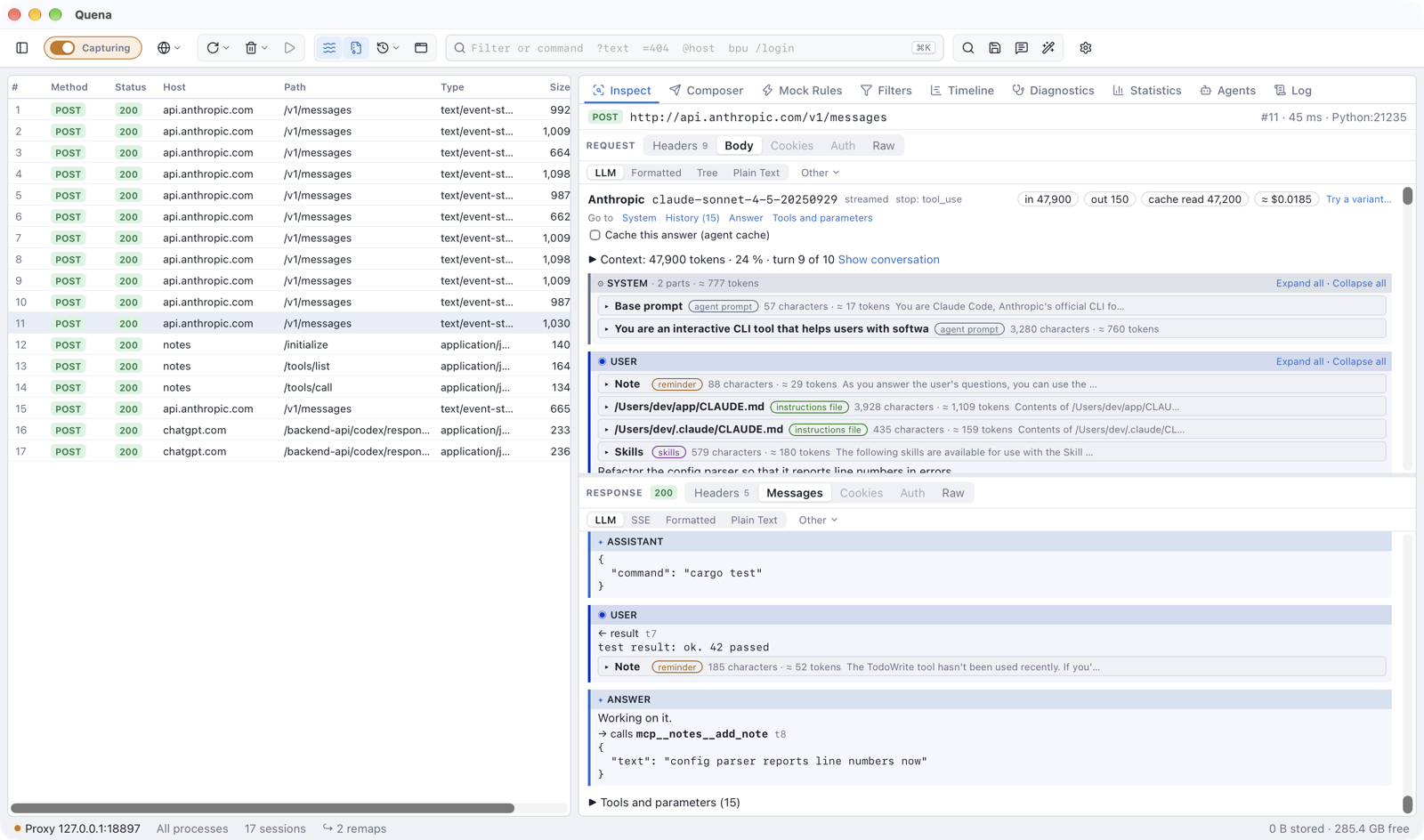
Selecting such a session opens the LLM view (on both the request and the response side):
- a header with provider, model, whether the answer was streamed, the stop reason
(
stop,end_turn,tool_calls,max_tokens…), the token usage (input, output, read from and written to the provider's cache, reasoning) and the estimated cost; - the system prompt (also
instructions,systemInstruction; Codex sends it in the role developer, shown as System (developer)), without Claude Code's attribution block (x-anthropic-billing-header: …), which changes with every request; - the messages sent, by role: text, images as placeholders, tool calls with their arguments and tool results with the call they answer;
- the answer: text, thinking or reasoning summaries (collapsed), tool calls. Streams (server-sent events, Ollama's JSON lines, Gemini's array, AWS's event stream) are put together;
- tools and parameters: the tool definitions offered and the parameters sent
(
temperature,max_tokens,reasoning_effort,thinking…); - under the answer, the MCP exchanges that ran its tool calls (see Tool call trail);
- Context: the call's turn in its conversation (Show conversation opens the Agents panel), the map of what fills its input, the change from the call it continues and the provider's cache verdict, described on Agent conversations.
Prompt parts. Agents put much more into a request than what you typed: their base
prompt, skills, sandbox rules, instruction files (CLAUDE.md, AGENTS.md), the environment,
reminders. The view takes the system prompt and the user messages apart and shows each part
as a section with a title (Base prompt, Skills, Permissions, Environment, the
instruction file's path, the tag for others), a coloured label for its kind (agent prompt,
instructions file, skills, context, reminder, summary), its size in characters and estimated
tokens and, while collapsed, its first line. What the agent added starts collapsed; what you
or the model wrote is always shown. Expand all and Collapse all work per block, a section
you open stays open in the next call you select, and ⧉ copies a part.
The view scrolls as one: texts have no scroll boxes of their own, the heads of the role and of the open section stay at the top while their text scrolls past, and texts over 300 lines or 30,000 characters show their beginning with Show all. Go to in the header jumps to the system prompt, the history, the answer or the tools.
An error the API answered with (rate limit, invalid request) is shown at the top. Texts longer than 200,000 characters are shortened in this view; the body views show them whole. A stream that ended early says so.
From the view, Cache this answer puts a successful answer into the agent cache, and Try a variant… sends the call again with changes (Try a variant).
In the session list
When a call is done, it gets the flags x-quena-llm (provider/model),
x-quena-llm-tokens, x-quena-llm-usage and x-quena-llm-cost. LLM and MCP requests also
get x-quena-agent, the agent or SDK that sent them, read from the User-Agent
(Claude Code 2.0.14, Codex 0.46.0, Gemini CLI, Cursor, GitHub Copilot,
OpenAI SDK (Python) …; for clients Quena does not know, the first word of the User-Agent,
such as my-app/1.2). The flags
are kept in .saz archives. LLM calls in archives from other tools (without Quena's flags)
get them when the Agents panel opens.
- Columns LLM, Tokens, Cost and Agent (right-click the column headers); they sort. The column Conversation is described on Agent conversations.
- Group by → LLM model puts the calls of each model together, Group by → Agent (Claude Code, Codex …) those of each agent.
- Filters:
llm ~ claude,llm == "OpenAI/gpt-4o",tokens > 10000,agent ~ "claude code"(see syntax). - Statistics lists calls, tokens and estimated cost per model for the selection.
Costs
The cost is an estimate: tokens times the model's list price. Input read from the provider's cache is charged at the cached price, input written to it at the cache-write price, and the rest at the input price. Discounts and batch prices are not known, and models without a price show cost unknown. Answers from Quena's agent cache cost nothing and are not added up. Prices come from three places, and the first that knows the model wins (Settings → Bodies & Storage → LLM prices shows all three):
-
Your own prices in
llm-prices.jsonin the data directory (Create llm-prices.json / Edit llm-prices.json opens it). US dollars per million tokens, by model name prefix (the longest prefix wins).cacheReadandcacheWritedefault to the input price;context, the model's context window in tokens, is optional:{ "gpt-5.1": { "input": 1.25, "output": 10, "cacheRead": 0.125 }, "claude-opus-4-5": { "input": 5, "output": 25, "cacheRead": 0.5, "cacheWrite": 6.25 }, "my-model": { "input": 0.5, "output": 1.5, "context": 128000 }, "llama": { "input": 0, "output": 0 } }Changes count from the next call on, without a restart. A file that is not valid JSON is reported in the settings, the log and the LLM view; its prices are not used until it is fixed.
-
The fetched price list: Fetch prices / Update prices downloads LiteLLM's price list (MIT licence, several hundred models of OpenAI, Anthropic, Google, Mistral, DeepSeek, Groq, Bedrock, Azure …) through Quena's upstream settings and keeps it in
llm-prices-litellm.jsonin the data directory. This is the only time Quena asks for prices, and only when clicked; Remove list goes back to the other two. A model matches by its name with a date or release tag at most (gpt-4o-2024-08-06→gpt-4o). -
Built-in list prices of common OpenAI, Anthropic, Google, Mistral and DeepSeek models as their providers published them, each with the month it was taken (the cost's tooltip says built-in list prices, 2025 or 2026-10), matched like the fetched list (a newer
claude-opus-4-7does not get the price ofclaude-opus-4). Prices change: for current ones fetch the price list or add your own.
Model names are compared without a provider path (openai/gpt-4o) and without Bedrock's
region, vendor and version (us.anthropic.claude-sonnet-4-5-20250929-v1:0 →
claude-sonnet-4-5-20250929).
Replay answers without calling the model
To test an application without paying for (or waiting on) the model, answer its calls from recorded sessions: select them and use Mock Rules → Mocks from Sessions… (see mocks from a capture). With Match request bodies each prompt gets its own recorded answer (JSON compared regardless of key order); without it, In recorded order answers the calls one after the other. Streamed answers are replayed as recorded.
To answer an agent's repeated calls automatically, or to run an agent again against a recorded run, use the agent cache and Freeze a run for replays.
For AI agents
Over Quena's MCP server, get_llm_call returns a call taken apart the same way;
the session rows carry llm and tokens. Unless agents may see secrets, the bodies are
redacted first (credentials and secret fields), as for get_session. The tools for
conversations are listed on Agent conversations.