AI agents
AI agents such as Claude Code, Codex, Gemini CLI or an app of your own talk to their model over HTTPS and call their tools on MCP servers. When that traffic goes through Quena, every model call becomes readable, and Quena puts the calls of one agent run together.
- LLM traffic: each call to a model API taken apart: the system prompt, the messages, tool calls and results, the answer (also from a stream), the tokens and what they cost.
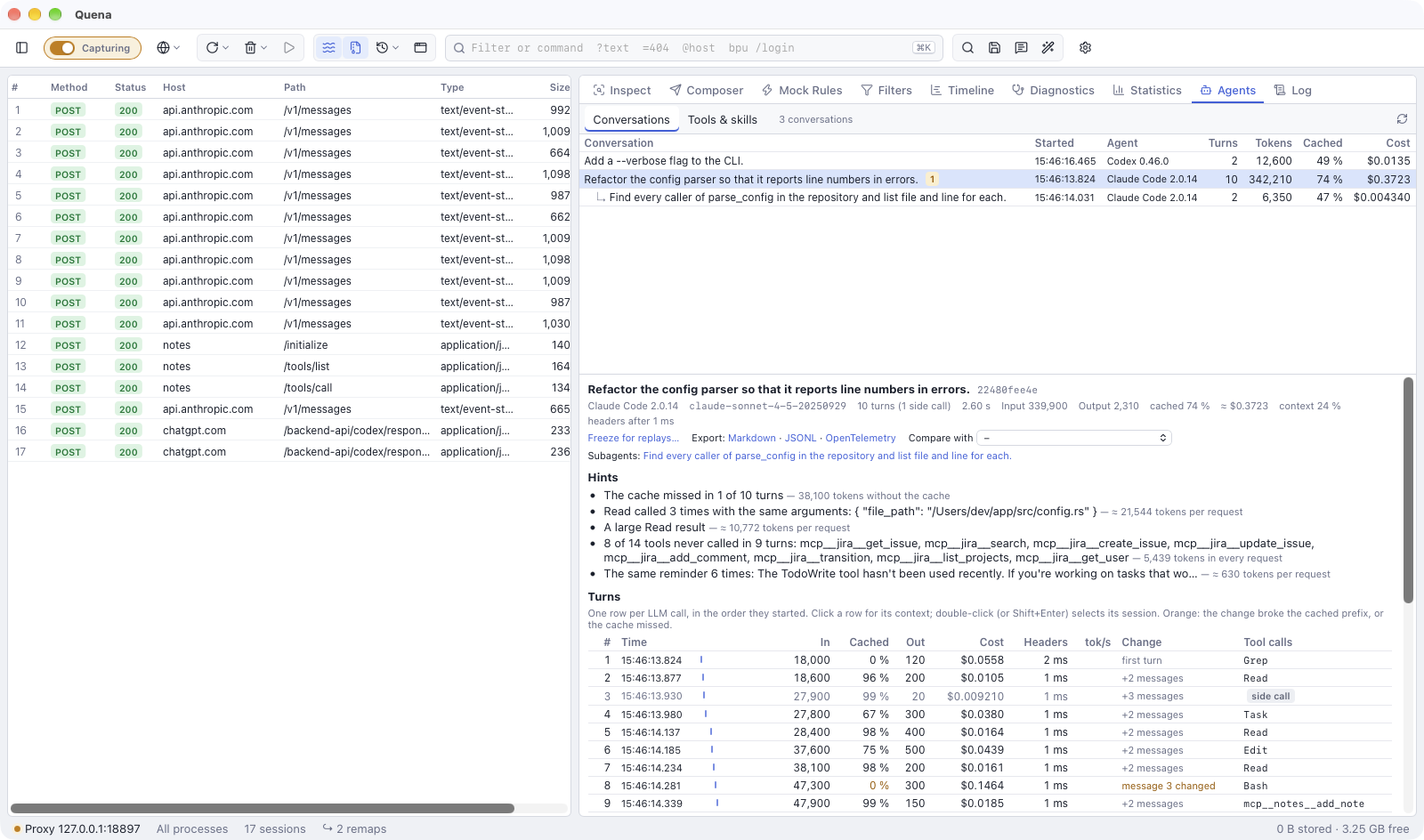
- Agent conversations: the calls of one run in order, with subagents and side calls, what changed from one call to the next, why the provider's prompt cache missed, where tokens go to waste, and a map of what fills the context.
- MCP servers and skills: every tool call with its arguments and result, traced from the model's answer to the MCP server and back, also for servers that talk over stdio. Which tools are offered and never called, and what they cost.
- Optimising agents: try a variant of a call, change requests while the agent runs, stop before LLM requests, answer repeated calls from Quena's agent cache, freeze a run and replay against it, and compare two runs.
- Quena's MCP server: the other way round. An agent reads the capture through Quena's own MCP server and, if you allow it, controls Quena.
Terms
The agent pages use these words with one meaning each:
| Term | Meaning |
|---|---|
| Conversation | One agent run: the LLM calls that continue one another. |
| Turn | One LLM call in a conversation. Side calls, variants and answers from the agent cache count as turns too. |
| Side call | A call that no later turn continues, such as Claude Code's prompt suggestions and summaries. |
| Subagent | A conversation started by another one (Claude Code's Task, a Codex sub-thread). It is listed under its parent. |
| Prompt cache | The provider's cache: it keeps the start of a request and charges it at a lower price the next time. |
| Agent cache | Quena's cache: it answers a request it has seen before without asking the model at all. |
| MCP traffic | Exchanges between an agent and the MCP servers it uses, which Quena records and shows. |
| Quena's MCP server | The MCP server Quena itself offers, so that an agent can read the capture. |
Get agent traffic into Quena
- Turn on HTTPS decryption (HTTPS and devices). Model APIs and most MCP servers use HTTPS; without decryption Quena sees only tunnels. A host under Skip decryption for or Do not capture stays hidden as well.
- Start the agent through Quena. Capture → Start Agent… asks for the agent's command
(
claude,codex,gemini…); the globe button's menu also has Start Claude Code and Start Codex. Quena opens a terminal whose environment names Quena as proxy and trusts its root certificate, and runs the command there. On macOS and Linux it runs in an interactive login shell ($SHELL -l -i -c …), so what your.zshrcor.bashrcadds toPATH(nvm, for example) is found; when the agent ends, a fresh login shell stays open. See Start a browser or terminal with Quena for every variable the terminal sets. -
Or set the variables yourself in the shell you start the agent from:
HTTPS_PROXY(andHTTP_PROXY) pointing to Quena,http://127.0.0.1:8866by default;NODE_EXTRA_CA_CERTSwith the path of Quena's root certificate for Node.js agents (Claude Code, Gemini CLI),CODEX_CA_CERTIFICATEfor Codex.
Node.js agents ignore the system proxy on macOS and Windows, so turning on the system proxy alone does not capture them.
-
Servers that talk over stdio run as local processes; no proxy sees them. Put
quena-cli mcp-tapin front of their command (see Servers that talk over stdio).
Then work with the agent as usual. Its calls appear in the session list, and View → Agents shows its runs.
IDE agents (Cursor, GitHub Copilot in VS Code) use the proxy settings of their IDE. A company proxy between Quena and the internet goes into Quena's upstream settings, not into the agent.
A quick tour
- Select an LLM call in the session list (filter
llm, or the column LLM). The LLM view shows the call taken apart, with its tokens and cost, and under Context its place in the conversation. - Show conversation in that view (or View → Agents) opens the Agents panel: the run with all its turns, the hints where tokens go to waste and the context map.
- Select an MCP exchange (filter
mcp): the MCP view shows the tool call and its trail back to the LLM calls that asked for it and carried its result. - Agents → Tools & skills sums up which tools and skills all runs offered and used.
Privacy
- Everything Quena records stays on your machine: the prompts, tool arguments and results are in the capture and in the archives you save. Quena itself sends nothing anywhere.
- A variant from the prompt playground is a real call: it goes to the provider with the original request's credentials and costs tokens (Try a variant).
- Exports of a conversation as Markdown or JSON lines hold the full content, including the system prompt, file contents the agent read and any secrets in them. Nothing is redacted (Export a conversation).
- Fetching prices downloads LiteLLM's price list once, when you click it (Costs).
- An agent that reads the capture through Quena's MCP server sends what it reads to its own model provider. Quena replaces credentials and secret fields first, unless you allow agents to see them (What agents see and touch).